前言
这两天由于需要搭建了一个FTP的服务端,但是遇到些问题,所以记录下,以便后续查阅。
服务端软件包及部署
https://github.com/garethflowers/docker-ftp-server
参考官方的readme
遇到的问题即解决办法
1.线程过多容器崩溃
官方的docker compose文件
services:
    ftp-server:
        container_name: my-ftp-server
        environment:
            - PUBLIC_IP=192.168.0.1
            - FTP_PASS=123
            - FTP_USER=user
        image: garethflowers/ftp-server
        ports:
            - "20-21:20-21/tcp"
            - "40000-40009:40000-40009/tcp" # For passive mode
        volumes:
            - "/data:/home/user"
这中遇到意外错误不会重启,修改如下:
services:
    ftp-server:
        container_name: my-ftp-server
        restart: unless-stopped
        environment:
            - PUBLIC_IP=192.168.0.1
            - FTP_PASS=123
            - FTP_USER=user
        image: garethflowers/ftp-server
        ports:
            - "20-21:20-21/tcp"
            - "40000-40009:40000-40009/tcp" # For passive mode
        volumes:
            - "/data:/home/user"
2.在docker compose中限制内存,CPU数不生效
解决办法:将配置文件映射进容器配合限制
    volumes:
      - "/home/dmj/ftp/data:/home/dmj"
      # 挂载自定义vsftpd配置文件
      - "/home/dmj/ftp/config/vsftpd.conf:/etc/vsftpd/vsftpd.conf:ro"
      # 资源限制:统一放到deploy段,包含CPU、内存、进程数
配置文件如下:
# Example config file /etc/vsftpd.conf
#
# The default compiled in settings are fairly paranoid. This sample file
# loosens things up a bit, to make the ftp daemon more usable.
# Please see vsftpd.conf.5 for all compiled in defaults.
#
# READ THIS: This example file is NOT an exhaustive list of vsftpd options.
# Please read the vsftpd.conf.5 manual page to get a full idea of vsftpd's
# capabilities.
#
# Allow anonymous FTP? (Beware - allowed by default if you comment this out).
anonymous_enable=NO
#
# Uncomment this to allow local users to log in.
local_enable=YES
#
# Uncomment this to enable any form of FTP write command.
write_enable=YES
#
# Default umask for local users is 077. You may wish to change this to 022,
# if your users expect that (022 is used by most other ftpd's)
local_umask=022
#
# Uncomment this to allow the anonymous FTP user to upload files. This only
# has an effect if the above global write enable is activated. Also, you will
# obviously need to create a directory writable by the FTP user.
#anon_upload_enable=YES
#
# Uncomment this if you want the anonymous FTP user to be able to create
# new directories.
#anon_mkdir_write_enable=YES
#
# Activate directory messages - messages given to remote users when they
# go into a certain directory.
dirmessage_enable=YES
#
# Activate logging of uploads/downloads.
xferlog_enable=YES
#
# Make sure PORT transfer connections originate from port 20 (ftp-data).
connect_from_port_20=YES
#
# If you want, you can arrange for uploaded anonymous files to be owned by
# a different user. Note! Using "root" for uploaded files is not
# recommended!
#chown_uploads=YES
#chown_username=whoever
#
# You may override where the log file goes if you like. The default is shown
# below.
#xferlog_file=/var/log/vsftpd.log
#
# If you want, you can have your log file in standard ftpd xferlog format.
# Note that the default log file location is /var/log/xferlog in this case.
#xferlog_std_format=YES
#
# You may change the default value for timing out an idle session.
idle_session_timeout=60
#
# You may change the default value for timing out a data connection.
data_connection_timeout=120
#
# It is recommended that you define on your system a unique user which the
# ftp server can use as a totally isolated and unprivileged user.
#nopriv_user=ftpsecure
#
# Enable this and the server will recognise asynchronous ABOR requests. Not
# recommended for security (the code is non-trivial). Not enabling it,
# however, may confuse older FTP clients.
#async_abor_enable=YES
#
# By default the server will pretend to allow ASCII mode but in fact ignore
# the request. Turn on the below options to have the server actually do ASCII
# mangling on files when in ASCII mode.
# Beware that on some FTP servers, ASCII support allows a denial of service
# attack (DoS) via the command "SIZE /big/file" in ASCII mode. vsftpd
# predicted this attack and has always been safe, reporting the size of the
# raw file.
# ASCII mangling is a horrible feature of the protocol.
#ascii_upload_enable=YES
#ascii_download_enable=YES
#
# You may fully customise the login banner string:
#ftpd_banner=Welcome to blah FTP service.
#
# You may specify a file of disallowed anonymous e-mail addresses. Apparently
# useful for combatting certain DoS attacks.
#deny_email_enable=YES
# (default follows)
#banned_email_file=/etc/vsftpd.banned_emails
#
# You may specify an explicit list of local users to chroot() to their home
# directory. If chroot_local_user is YES, then this list becomes a list of
# users to NOT chroot().
# (Warning! chroot'ing can be very dangerous. If using chroot, make sure that
# the user does not have write access to the top level directory within the
# chroot)
#chroot_local_user=YES
#chroot_list_enable=YES
# (default follows)
#chroot_list_file=/etc/vsftpd.chroot_list
#
# You may activate the "-R" option to the builtin ls. This is disabled by
# default to avoid remote users being able to cause excessive I/O on large
# sites. However, some broken FTP clients such as "ncftp" and "mirror" assume
# the presence of the "-R" option, so there is a strong case for enabling it.
#ls_recurse_enable=YES
#
# When "listen" directive is enabled, vsftpd runs in standalone mode and
# listens on IPv4 sockets. This directive cannot be used in conjunction
# with the listen_ipv6 directive.
listen=YES
#
# This directive enables listening on IPv6 sockets. To listen on IPv4 and IPv6
# sockets, you must run two copies of vsftpd with two configuration files.
# Make sure, that one of the listen options is commented !!
#listen_ipv6=YES
max_per_ip=20
# 开启本地用户登录
local_enable=YES
write_enable=YES

# 被动模式设置
pasv_enable=YES
pasv_min_port=40000
pasv_max_port=40009
pasv_address=[IP]
# 服务器 IP
pasv_addr_resolve=NO

# 兼容性设置
seccomp_sandbox=NO
allow_writeable_chroot=YES
完整docker compose:
services:
  ftp-server:
    container_name: dmj-ftp-server
    restart: unless-stopped
    environment:
      - PUBLIC_IP=[你的IP]
      - FTP_PASS=[你的密码]
      - FTP_USER=[你的用户]
      - PASV_MIN_PORT=40000
      - PASV_MAX_PORT=40009
    image: garethflowers/ftp-server
    ports:
      - "40020-40021:20-21/tcp"
      - "40000-40009:40000-40009/tcp"
    volumes:
      - "/home/dmj/ftp/data:/home/dmj"
      # 挂载自定义vsftpd配置文件
      - "/home/dmj/ftp/config/vsftpd.conf:/etc/vsftpd/vsftpd.conf:ro"
    # 资源限制:统一放到deploy段,包含CPU、内存、进程数
    deploy:
      resources:
        limits:
          memory: 4G
          # 内存限制4G
          cpus: '2.0'
          # CPU限制2核
          pids: 100
          # 进程数限制100(替代顶层pids_limit)
        reservations:
          memory: 1G
          # 内存预留1G
          cpus: '1.0'
          # CPU预留1核
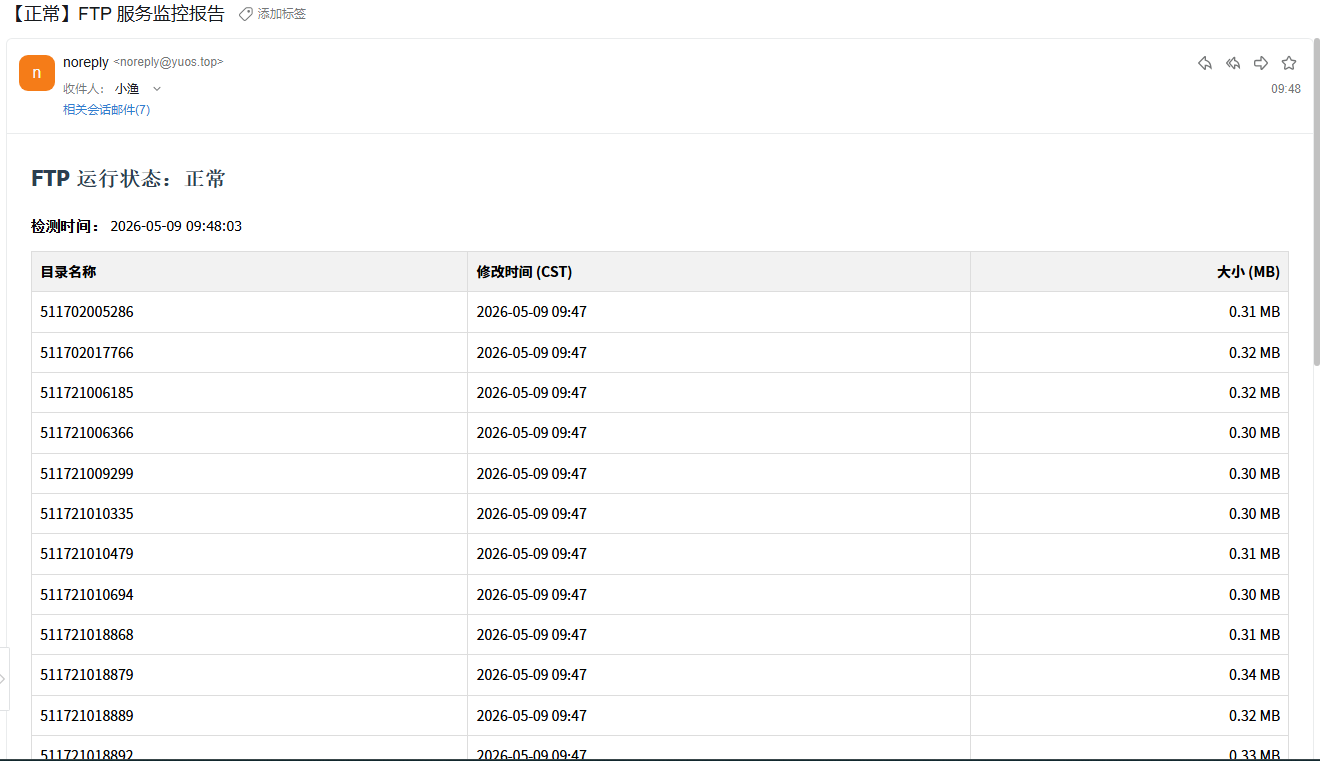
部署邮件定时监控
nano ftp-check.sh
#!/bin/bash

# --- FTP 配置 ---
FTP_HOST="【ftp服务器IP】"
FTP_PORT="【端口号】"
FTP_USER="【用户名】"
FTP_PASS="【密码】"
LOCAL_FILE="ping.txt"

# --- SMTP 邮件配置 ---
SMTP_SERVER="【smtp服务器地址:端口号】"
SMTP_USER="【发件人邮箱】"
SMTP_PASS="【发件人邮箱密码】"
TARGET_EMAIL="【收件人邮箱地址】"

# 1. 创建本地测试文件
echo "FTP Check - $(date '+%Y-%m-%d %H:%M:%S')" > $LOCAL_FILE

# 2. 执行 FTP 上传
lftp -u "${FTP_USER}","${FTP_PASS}" -p ${FTP_PORT} ${FTP_HOST} <<EOF
set ftp:passive-mode true
set net:timeout 10
set net:max-retries 1
put $LOCAL_FILE -o ./$LOCAL_FILE
quit
EOF

FTP_STATUS=$?

# 3. 构造 HTML 邮件内容
if [ $FTP_STATUS -eq 0 ]; then
    # 获取原始目录列表
    DIR_LIST=$(lftp -u "${FTP_USER}","${FTP_PASS}" -p ${FTP_PORT} ${FTP_HOST} -e "set ftp:passive-mode true; ls; quit")

    CUR_YEAR=$(date +%Y)

    # 核心处理:手动加8小时,计算MB,累加总大小
    # 使用临时文件存储 awk 的输出,防止变量截断
    awk -v year="$CUR_YEAR" '
    BEGIN {
        split("Jan Feb Mar Apr May Jun Jul Aug Sep Oct Nov Dec", months, " ")
        for (i=1; i<=12; i++) m[months[i]] = sprintf("%02d", i)
        total_bytes = 0
    }
    /^d/ {
        # 解析原始时间:$8 是 HH:MM
        split($8, time_part, ":")
        hour = time_part[1] + 8
        day = $7
        month = m[$6]

        # 简单的进位处理(如果加8后超过24点,日期+1,这里仅做小时修正以对齐宝塔)
        if (hour >= 24) { hour -= 24; day += 1 }

        formatted_date = sprintf("%s-%s-%02d %02d:%s", year, month, day, hour, time_part[2])

        size_mb = $5 / 1024 / 1024
        total_bytes += $5

        printf "ROW|<tr><td style=\"border:1px solid #ddd;padding:8px;\">%s</td><td style=\"border:1px solid #ddd;padding:8px;\">%s</td><td style=\"border:1px solid #ddd;padding:8px;text-align:right;\">%.2f MB</td></tr>\n", $9, formatted_date, size_mb
    }
    END {
        printf "TOTAL|%.2f\n", total_bytes / 1024 / 1024
    }' <<< "$DIR_LIST" > /tmp/ftp_res.tmp

    # 从临时文件提取内容
    HTML_ROWS=$(grep "^ROW|" /tmp/ftp_res.tmp | cut -d'|' -f2-)
    TOTAL_SIZE_MB=$(grep "^TOTAL|" /tmp/ftp_res.tmp | cut -d'|' -f2)

    SUBJECT="【正常】FTP 服务监控报告"
    CONTENT="<html><body>
    <h2 style='color:#2c3e50;'>FTP 运行状态:正常</h2>
    <p><b>检测时间:</b> $(date '+%Y-%m-%d %H:%M:%S')</p>
    <table style='border-collapse:collapse;width:100%;font-family:sans-serif;font-size:14px;'>
        <thead style='background-color:#f2f2f2;'>
            <tr>
                <th style='border:1px solid #ddd;padding:8px;text-align:left;'>目录名称</th>
                <th style='border:1px solid #ddd;padding:8px;text-align:left;'>修改时间 (CST)</th>
                <th style='border:1px solid #ddd;padding:8px;text-align:right;'>大小 (MB)</th>
            </tr>
        </thead>
        <tbody>
            $HTML_ROWS
        </tbody>
        <tfoot style='background-color:#f9f9f9;font-weight:bold;'>
            <tr>
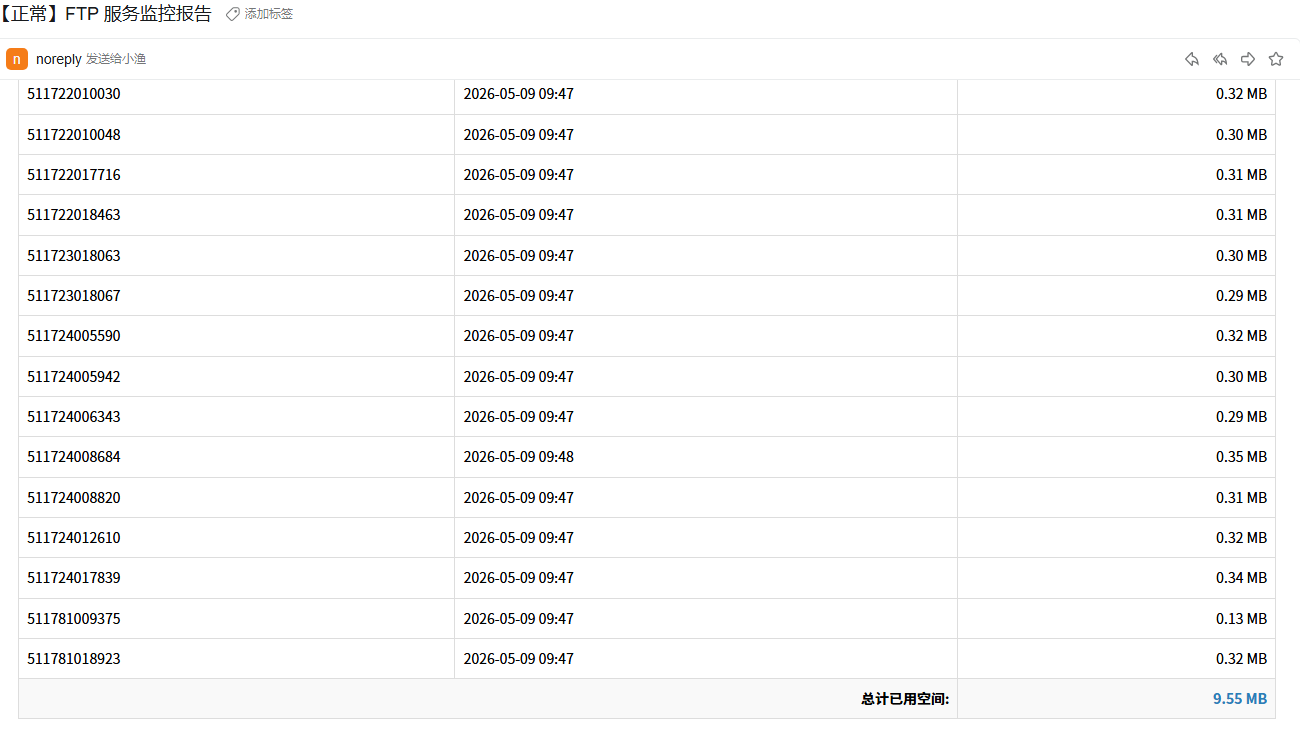
                <td colspan='2' style='border:1px solid #ddd;padding:8px;text-align:right;'>总计已用空间:</td>
                <td style='border:1px solid #ddd;padding:8px;text-align:right;color:#2980b9;'>$TOTAL_SIZE_MB MB</td>
            </tr>
        </tfoot>
    </table>
    </body></html>"
else
    SUBJECT="【告警】FTP 服务异常"
    CONTENT="<html><body><h2 style='color:#e74c3c;'>FTP 运行状态:异常</h2><p>无法连接 FTP 服务器。</p></body></html>"
fi

# 4. 发送邮件
echo -e "$CONTENT" | s-nail -v \
    -s "$SUBJECT" \
    -S smtp="smtps://${SMTP_SERVER}" \
    -S smtp-auth=login \
    -S smtp-auth-user="$SMTP_USER" \
    -S smtp-auth-password="$SMTP_PASS" \
    -S ssl-verify=ignore \
    -S from="$SMTP_USER" \
    -M "text/html" \
    "$TARGET_EMAIL"

# 5. 清理
rm -f $LOCAL_FILE /tmp/ftp_res.tmp
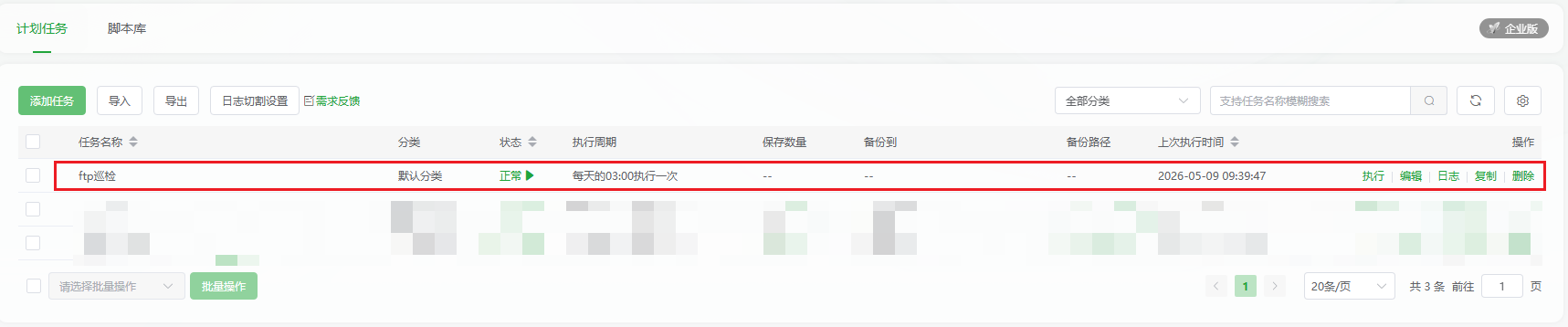
配合宝塔的定时任务: